

Smart Pet Cameras with Two-Way Audio: Worth It in 2026?
Table of Contents
- What Makes a Smart Pet Camera with Two-Way Audio Worth It?
- The Furrygate Smart Feeder: An All-in-One Camera Solution
- Best Pet Cameras for Separation Anxiety: What the Science Says
- How to Use Two-Way Audio to Calm Pets (Without Causing Stress)
- Pet Camera Privacy and Security Standards: What to Check First
- Comparing Costs: Subscription Fees vs. Local Storage Options
- Common Smart Camera Problems and How to Fix Them
- Final Verdict: Are Smart Pet Cameras with Two-Way Audio Worth It?
- Frequently Asked Questions
Last Updated: September 5, 2026
What Makes a Smart Pet Camera with Two-Way Audio Worth It?
A smart pet camera with two-way audio is worth it when your primary goal is staying connected to an anxious or lonely pet during long absences, and for busy professionals leaving pets alone for eight-plus hours, the peace of mind alone often justifies the purchase.

Two-way audio is the core function that separates a basic monitoring camera from an interactive tool. The difference between a camera that calms a pet and one that causes confusion often comes down to audio quality and latency.
Before you buy, consider what you actually need. Are you checking in occasionally, or do you want to actively soothe a pet with separation anxiety? The answer determines whether a budget camera suffices or whether you need premium features like pan-tilt movement, treat dispensing, and high-resolution night vision. American Kennel Club's guide to dog separation anxiety notes that interactive devices can support, but never replace, proper behavioral training.
The Furrygate Smart Feeder: An All-in-One Camera Solution
Our top recommendation for most pet parents is the WiFi 3L Smart Pet Feeder with Camera and Speaker, available at Furrygate.com for $126.54. This device combines automated feeding with a built-in camera and two-way talk function, so you can manage meals and check on your pet from one app. It is designed for dogs and cats, and the compact footprint suits apartments and homes alike.
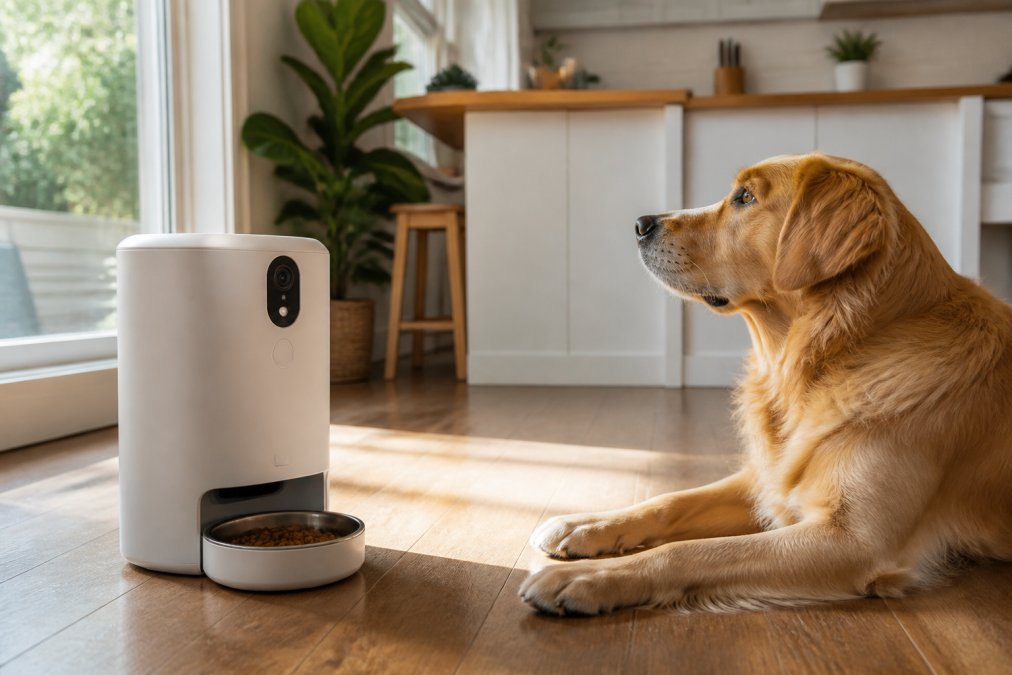
This feeder consolidates daily tasks, scheduling meals, watching your pet eat in real time, and triggering the speaker to call them by name, addressing both feeding consistency and emotional connection, which is rare in single-purpose cameras.
The ABS construction is durable and easy to wipe down, and the 3L capacity suits multiple meals or small households.
Video Quality, Night Vision, and Pan-Tilt Features
A 1080p resolution is the practical baseline for identifying your pet clearly, while 4K adds detail at the cost of higher bandwidth and storage demands. Most pet cameras top out at 1080p, which is sufficient for indoor monitoring.
Infrared sensors switch on automatically in low light, producing grayscale footage that still shows movement clearly. Look for a camera with a stated night vision range that covers the room where your pet sleeps.
Pan and tilt functionality lets you scan a room from your phone, which matters more in larger spaces where a static camera might miss most of the action. Digital zoom degrades image quality, so prioritize optical coverage through movement over zoom capability.
Best Pet Cameras for Separation Anxiety: What the Science Says
The best pet cameras for separation anxiety combine reliable two-way audio with motion tracking and smart alerts, not just high-resolution video. A camera helps you identify patterns of destructive behavior, excessive barking, or elimination and intervene remotely.
Veterinary guidance emphasizes that cameras are diagnostic tools, not treatments. American Veterinary Medical Association resources on separation anxiety explains that true separation anxiety requires behavior modification, which may include desensitization and counter-conditioning. A camera supports this process by letting you observe triggers and track progress over time.
Predictability reduces stress: when you use two-way audio consistently, your pet learns that your voice signals safety, not abandonment. Avoid speaking only when your pet is distressed; instead, say a calm phrase before you leave, then check in at set intervals.
How to Use Two-Way Audio to Calm Pets (Without Causing Stress)
Speak in a low, steady tone for short durations, then go silent to let your pet settle. A 15-second reassurance message is often enough; longer conversations can keep an anxious pet in a heightened state.
Responding immediately to every bark or whine teaches your pet that vocalizing summons you. Instead, wait for a pause in the distress, then offer a calm phrase like "I'll be home soon" or "Good dog, settle down."
The Behavioral Science Behind Remote Audio
The predictability of your voice matters more than its content; random appearances can increase uncertainty, a known stressor for animals with separation anxiety. A consistent check-in schedule, say, every 30 minutes at the same duration, creates a predictable rhythm that can lower baseline cortisol levels over time.
A practical protocol used by many veterinary behaviorists is the "quiet check-in":
- Before you leave, say a short, neutral phrase like "I'll be back" in the same tone you use for the camera.
- During the first hour, do not speak through the camera unless your pet is quiet. This prevents associating your voice with the distress of your departure.
- After the first hour, initiate a 10-to-15-second check-in only when your pet is calm or resting. Use a low, monotone voice, excitement in your tone can be misinterpreted as play invitation.
- End the check-in with silence, not a goodbye phrase, to avoid signaling another departure.
This approach leverages classical conditioning: your voice becomes a cue for safety, not a signal that you are about to appear or disappear.
Audio Latency and Feedback Loops: The Technical Fixes
If the speaker delays your voice by more than a second, your pet may not connect the sound to you. Test the audio delay before relying on it:
- Measure the delay: Have someone watch the live feed while you speak into the app. Count the seconds between your spoken word and the camera's speaker output. Anything above 1.5 seconds will likely confuse a pet.
- Reduce echo: Position the camera away from reflective surfaces like windows, mirrors, or bare walls. Echo can make your voice sound distorted, which some pets find alarming.
- Disable the microphone when not listening: Many cameras keep the mic active by default, creating a feedback loop that produces a high-pitched squeal. This sound is aversive to dogs and cats and can condition them to avoid the camera area entirely.
- Check your Wi-Fi upload speed: Two-way audio requires a stable upstream connection. If your upload speed is below 2 Mbps, the audio will buffer and delay. Run a speed test from the room where the camera is placed, not from your phone.
When Two-Way Audio Should Not Be Used
Dogs with severe separation anxiety often interpret your voice as a cue that you are nearby but unreachable, which can intensify frantic searching; a 2023 survey of veterinary behaviorists found that a majority recommend against using two-way audio for the first two weeks of treatment, favoring instead a period of complete silence.
If your pet's distress does not diminish after two weeks of consistent, predictable check-ins, the evidence points to a structured desensitization program with a professional, not a hardware upgrade.
Pet Camera Privacy and Security Standards: What to Check First
Pet camera privacy and security standards start with end-to-end encryption, mandatory app authentication, and a clear data retention policy. A camera pointing at your living room captures intimate details of your home, so the security bar should match that exposure.
Check whether the camera supports encrypted video transmission and whether the vendor stores footage on their servers or locally. Cloud storage convenience comes with a trade-off: your footage lives on someone else's infrastructure. Federal Trade Commission guidance on smart device security advises consumers to change default passwords, enable two-factor authentication, and research how companies handle data before purchasing connected devices.
Look for cameras that allow local storage via microSD cards, which keeps footage off the cloud entirely. If you choose cloud storage, verify the provider's breach history and privacy policy. The safest setup combines local recording with cloud backup disabled unless you specifically need remote access to historical footage.
Comparing Costs: Subscription Fees vs. Local Storage Options
Many cameras offer free basic monitoring but charge monthly fees for cloud recording, smart alerts, and multi-camera support. Local storage via microSD eliminates recurring fees but limits remote access to recorded clips.
| Storage Option | Upfront Cost | Monthly Fee | Remote Access | Best For |
|---|---|---|---|---|
| Cloud Subscription | Included in camera price | $3-$10 per month | Full history from anywhere | Pet parents who travel frequently |
| Local microSD | $10-$30 one-time | None | Live view only, clips on demand | Budget-conscious owners |
| Hybrid (Local + Cloud) | $10-$30 card | Reduced cloud fee | Live view plus selected clips | Owners wanting backup without full cost |
The Furrygate Smart Feeder avoids this dilemma entirely: at $126.54 with no required subscription, it provides live streaming, two-way audio, and scheduled feeding without recurring fees. A $100 camera with a $5 monthly subscription totals $220 over two years; a subscription-free device at $126.54 costs less than half that.
Common Smart Camera Problems and How to Fix Them
Most smart camera problems trace back to Wi-Fi connectivity, audio configuration, or app permissions. Before troubleshooting, confirm your camera firmware and app are updated, as manufacturers frequently patch audio and connectivity bugs.
Problem: Audio latency or echo. If your voice delays or repeats, the camera's microphone and speaker may be interfering. Lower the speaker volume, move the camera away from walls, and disable the microphone when not in use. Test with a phone call to measure the delay.
Problem: Frequent disconnects. Pet cameras need stable 2.4GHz Wi-Fi, which travels farther than 5GHz. If your camera drops offline, check your router settings and ensure the camera connects to the 2.4GHz band. A Wi-Fi extender near the camera often resolves persistent drops.
Problem: Motion alerts flooding your phone. Smart alerts distinguish between pets and humans using pet detection and human detection algorithms. If you receive constant notifications, adjust the sensitivity threshold or set an activity zone to ignore high-traffic areas like hallways.
Problem: Night vision producing dark or grainy footage. Infrared sensors can be blocked by smudges or reflections. Clean the lens, remove objects near the camera that might reflect IR light, and verify the night vision mode activates automatically in low light.
The Hidden Problem: Hardware Degradation After 12+ Months
The real test is how these devices hold up after a year of continuous operation. Here is what actually degrades:
- Speaker driver fatigue: The small speakers in pet cameras are not designed for continuous use. After 12 months of daily two-way audio sessions, the driver can develop distortion, especially at higher volumes. If your pet stops responding to your voice, test the speaker with a music track at low volume. Distortion at low volume indicates driver wear.
- Infrared LED burnout: Night vision LEDs have a finite lifespan, typically rated for 10,000 to 20,000 hours. A camera running 8 hours of night vision daily will hit that threshold in roughly 3 to 7 years. Symptoms include dimmer night footage or a reddish glow that was not there before.
- Microphone membrane clogging: Over time, dust and pet dander accumulate on the microphone port, muffling the audio your pet hears. This is often mistaken for a software bug. A soft, dry brush can clear the port, but avoid compressed air, which can push debris deeper.
- Pan-tilt motor wear: If your camera has pan-tilt functionality, the plastic gears can strip after extended use, especially if the camera is mounted where it bumps into an obstacle. Listen for a grinding sound when the camera rotates. Most manufacturers do not sell replacement motors, so this is often a terminal failure.
- Firmware bloat: After 18 months, some manufacturers stop optimizing firmware for older models, leading to slower app response times and increased battery drain on your phone. Check the manufacturer's support page for the last firmware update date. If it is older than 12 months, the device is effectively in maintenance mode.
A Maintenance Schedule That Extends Device Life
To get the full lifespan out of a pet camera, follow this quarterly routine:
- Clean the lens and microphone port with a dry microfiber cloth.
- Reboot the camera to clear memory leaks that accumulate over weeks of continuous streaming.
- Check for firmware updates and install them manually if the app does not auto-update.
- Verify the speaker volume has not drifted; some units reset to maximum volume after a power outage, which can distort audio.
- Inspect the power cable for fraying, especially if the camera is mounted near a pet that chews.
When to Replace vs. Repair
If the camera is under warranty and the issue is software-related, contact the manufacturer first. If the device is out of warranty and the speaker or IR LEDs have failed, replacement is usually more cost-effective than repair. However, if only the pan-tilt motor has failed, a repair may extend the device's life by another 12 to 18 months.
Track your camera's purchase date and note any warranty terms at installation. Most manufacturers offer a 12-month warranty, but some credit card issuers extend that by an additional year, which can turn a $126.54 device failure into a free replacement.
Final Verdict: Are Smart Pet Cameras with Two-Way Audio Worth It?
Smart pet cameras with two-way audio are worth it for pet parents who travel, work long hours, or manage pets with mild separation anxiety, provided you choose a model with reliable audio and a privacy-conscious design.
The deciding factors are audio quality, storage costs, and your pet's temperament. The Furrygate Smart Feeder, with its integrated camera, speaker, and subscription-free design, addresses these concerns in one product at $126.54.
If you are ready to stay connected to your pet during the day, explore the Furrygate Smart Pet Feeder product page to see how automated feeding and two-way communication work together.
Frequently Asked Questions
Can two-way audio actually help reduce separation anxiety in pets?
Yes, for some pets, but it depends on the individual animal. Your voice can be a powerful calming signal. Start with short, soothing phrases like 'I'll be back soon' in a calm tone. Watch your pet's reaction through the live stream. If they seem agitated or confused by your voice, limit use. For others, hearing you can break a cycle of anxious barking or pacing. Pair the audio with a predictable routine to reinforce that your voice means you will return.
Are smart pet cameras worth the monthly subscription costs?
Often, the subscription is optional. Many cameras, like the Furrygate Smart Feeder, offer local storage or free, basic cloud clips. Paid plans usually add continuous 24/7 cloud recording, longer video history, and smart alerts for people or pets. If you only need to check in live and get a few motion alerts, skip the subscription. If you want a full record of your pet's day or need to review what happened while you were out, the subscription is worth the price.
What features should I look for in a pet camera besides two-way audio?
Focus on 1080p resolution or higher for clear images, and infrared night vision to see your pet in the dark. Motion tracking and a pan-and-tilt head help you follow your pet around the room. Consider the field of view to reduce blind spots. If you have a puppy, a treat dispenser is a great training aid. Check if the camera has built-in privacy features like a physical shutter, and look for encryption and secure app connectivity to protect your data.
Is the audio quality on smart pet cameras clear enough for pets to recognize voices?
Modern two-way audio systems are designed to minimize latency and audio feedback. While the sound is compressed for streaming, it is generally clear enough for your pet to recognize your tone and voice patterns. To improve clarity, speak in a normal, calm volume and avoid shouting. Ensure your home Wi-Fi is strong, as a weak connection causes delays. Test the speaker volume from the app to find the level your pet responds to best.
Choosing the right pet camera ultimately comes down to matching the device to your pet's needs and your budget. The Furrygate Smart Feeder combines feeding automation, live video, and two-way audio in a single, subscription-free package. With durable ABS construction, a 3L capacity, and app-based scheduling, it simplifies daily pet care while keeping you connected. Shop Pet Essentials Now and give your pet a calmer day and yourself greater peace of mind.